 Photo Filters
Change Color of Image
Change color of image parts by name: choose clothes, hair, the background, an object or a car, then a new color. One free AI image per visitor.
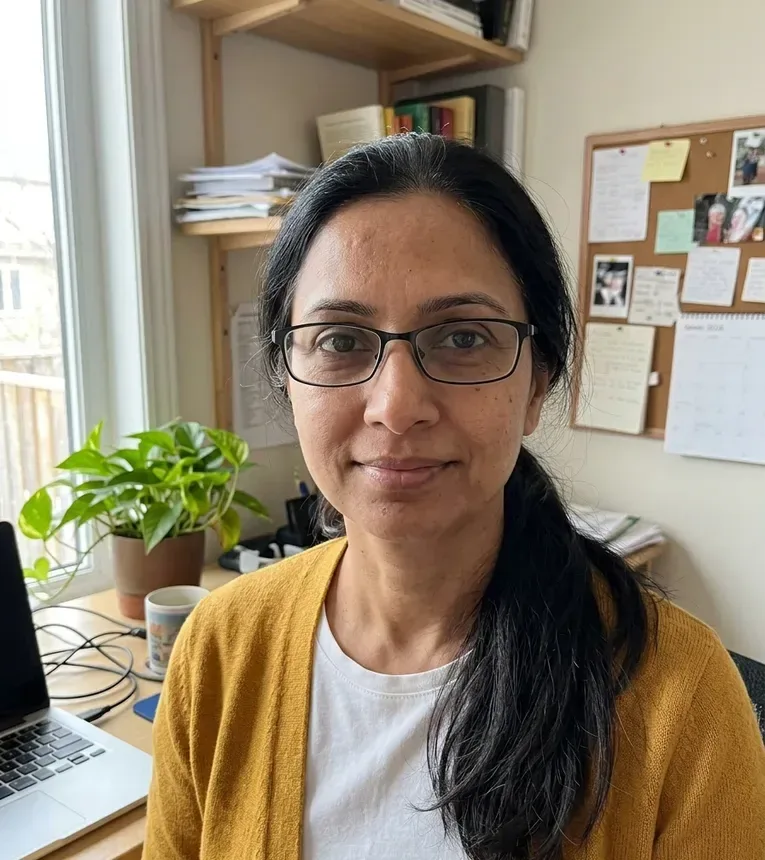 Before
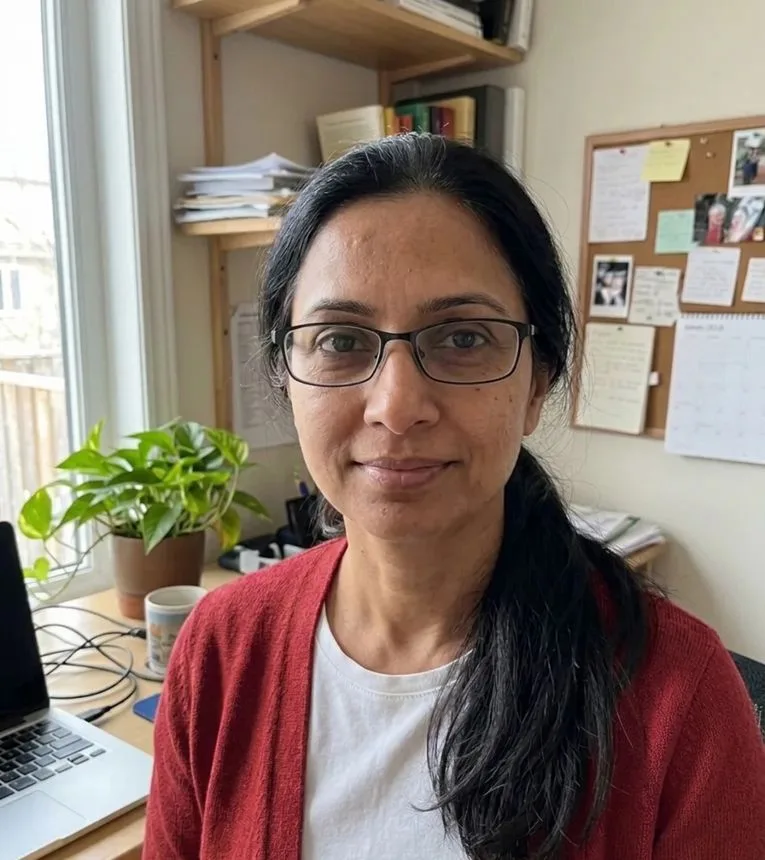 After
A color changer that recolors one part, not the whole photo
An AI recolor filter: your photo is uploaded and sent to an AI model with the part and color you pick.
Most color tools either tint the whole picture or ask you to click a color and hope nothing else shares it. This filter works the other way round. To change color of image parts here, you name the part, such as the shirt, the hair or the car, and pick the new color. The AI model is then told to repaint only that part and keep its shading, texture, highlights and edges, while the rest of the photo stays as it was.
The choices are fixed buttons: 5 things to recolor (Clothes, Hair, Background, Main object, Car) and 7 colors (Red, Blue, Green, Pink, Black, White, Gold). That makes 35 combinations, and each run uses one of them. There is no text box, color picker or hex code field.
Upload one photo, set both rows and press Generate. The result replaces your photo in the preview, ready to download. Each visitor gets one free AI image on this site, with no sign-up.
Made for
- Shoppers trying another colorway
- Anyone weighing a new hair color
- Car owners thinking about a respray
- Small sellers showing a product in other colors
- People who want a plainer background
Ways to change the color of an image, side by side
Four kinds of tool that change color of image areas, and what each asks of you. Pick by the photo you have and how much control you need.
| Recolor by name (this filter) | Color replace tools | Hue and saturation in a desktop editor | Whole-photo color filters | |
|---|---|---|---|---|
| How the area is chosen | You pick a part: clothes, hair, background, main object or car | You click a source color with an eyedropper | Eyedropper plus a layer mask you paint | No choice, every pixel changes |
| Choosing the new color | 7 preset colors | Any color, often by hex code | Hue, saturation and lightness sliders | Set by the filter (sepia, gray, inverted) |
| When the wall matches the shirt | Only the named part is meant to change | Both change unless you erase by hand | Both change unless you mask | Both change |
| Shading and folds | The model is told to keep them | Kept where the tolerance catches them | Kept, since only hue moves | Kept, colors shift together |
| Skill needed | Two button choices | Some trial with tolerance and eraser | Layers and masks | None |
| Available on this site | Yes, one free image per visitor | No | No | Yes: sepia, black and white, invert |
What you could recolor with this image color changer
Each card matches one of the five things the filter lets you recolor.
Clothes in a new colorway
See a jacket, dress or shirt you already own in red, blue or black before you buy it in that color or dye it. The garment is the default choice, so a full-length photo is all it needs.
A hair color preview
Try pink, gold, black or a deep blue on your own hair before a salon visit. It is a picture to talk through with a stylist, not a forecast of how dye will take.
A car in another paint
Picture your car in matte black, clean white or a rich red before paying for a wrap or a respray. A side view with the whole car in frame suits this best.
Product colors for a listing
Pick Main object to show a mug, bag or sneaker in a second color without a new shoot. Since it is AI output, compare it with the real item before you sell that color.
A calmer background
Change color of image backgrounds to white, black or green when a busy room pulls the eye from you. Handy for a profile picture where the plan is a cleaner look.
Matching a theme or event
Gold for a gala post, green or red for a team or a season, pink for a party invite. One color per run keeps the picture simple.
More filters
Frequently asked questions
Yes. Upload one photo, choose what to recolor and the new color, and press Generate. An AI model makes the recolored image, and you can download it. Each visitor gets one free image, with no sign-up.
When you press Generate, the photo is scaled down in your browser, uploaded to the site's storage and sent to an AI model, which returns the result. Uploads are kept only as long as the service needs them, and you can ask support to delete yours.
No. The filter offers seven fixed colors: Red, Blue, Green, Pink, Black, White and Gold. There is no color picker, hex field or free text box. If you need one exact brand shade, a color replace tool with hex input fits better.
Each run takes one part and one color, for example Hair and Pink. Each visitor gets one free image on this site, so pick the change that matters most.
The model is told to keep the shading, texture, highlights and edges of the part it recolors and to leave everything else alone. That is an instruction to an AI, not a check, so compare each result with your original before you use it.
This filter is made for photos, and a logo or flat graphic is not one of its options. For a logo you usually want a tool that swaps one exact color, with hex input. To flip every color of a graphic right now, our invert filter does that in your browser.
The filter takes one JPG, PNG or WebP photo up to 10 MB. Upload it, choose what to recolor and the new color, then press Generate. Other formats, such as HEIC from an iPhone, need converting to JPG first.
There is no app or browser extension. The site is a web page and the tool fits a phone screen, with the controls below the preview. Save iPhone photos as JPG, since HEIC files are not accepted.
Each visitor gets one free AI image, with no account and no card. There is no way to get more: the site has no paid plan. The browser filters have no limit.
To change color of image areas one part at a time, use this filter. The color filters that change the whole photo run in your browser with no limit: black and white, sepia and invert. They tint every pixel the same way, so they cannot pick out one shirt or one car.