 Photo Filters
Dither
Dither any photo with three algorithms and five retro palettes. Free, no sign-up, and your photo never leaves your browser.
 Before
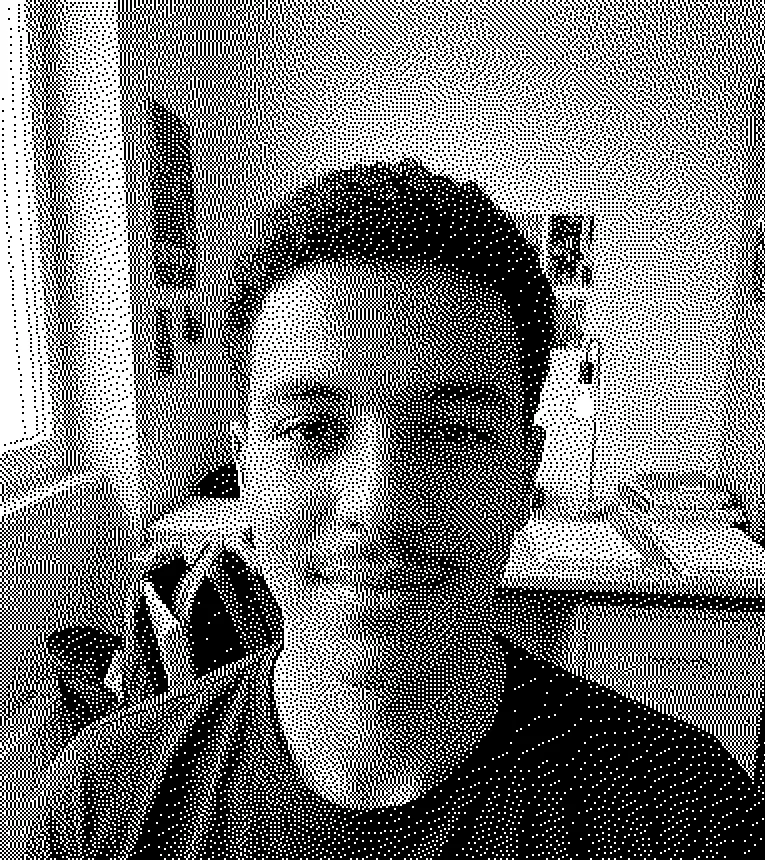 After
What it means to dither an image
Few colors, scattered dots, and your eye fills in the shades between them.
To dither an image is to redraw it with a small palette, sometimes only black and white, and to fake every missing shade with a pattern of dots. A gray wall becomes a mix of black and white pixels. From a step back, the eye blends them into gray again.
Old screens and printers did this because they could show only a few colors. Today people dither on purpose: the grainy, dotted look reads as early computer graphics, zines and photocopies.
This tool takes one JPG, PNG or WebP photo, runs the dither on a canvas inside your browser, and redraws the preview as you change a setting. Nothing is uploaded. When it looks right, you save a PNG.
Made for
- Pixel art and retro game fans
- Zine and poster makers
- Designers after a 1-bit look
- Album and playlist covers
- Web pages that want a lo-fi image
How to dither a photo in four settings
Every control redraws the dither preview right away. There is no apply button.
- 1
Drop in a photo
Click the box or drag a JPG, PNG or WebP file onto it, up to 20 MB. Photos larger than 2400 px on the long side are scaled down to that size first.
- 2
Pick an algorithm
Floyd-Steinberg passes each pixel's rounding error on to its neighbors for fine, even grain. Atkinson passes on only six eighths of it, so shadows close up and highlights blow out. Bayer (ordered) uses a fixed 8 x 8 pattern for a cross-hatched texture.
- 3
Choose a palette and pixel size
Black and white, 4 grays and Handheld green dither on brightness alone; CGA and 8 colors dither on color. Pixel size 1 to 8 px sets how big each dot is: the photo is shrunk by that factor, dithered, then scaled back up with hard edges, so the output keeps its size.
- 4
Set contrast and download
Contrast from -50 to 50 is applied before the dither, which helps a flat photo pick out its shapes. Hold the preview or the Space key to see the original, then save the PNG.
Dither, posterize image, threshold or pixelate?
Dither is one of four ways to cut a photo down to a few colors. Here is what each one leaves you with.
| Dither (this page) | Posterize | Threshold | Pixelate | |
|---|---|---|---|---|
| What it does | Small palette, missing shades faked with dots | Snaps each tone to the nearest of a few levels | Every pixel becomes black or white | Averages the photo into big square blocks |
| Gradients look like | Dot patterns that blend from a distance | Flat bands of color | Hard black and white shapes | Steps of blocks |
| Colors kept | 2, 4 or 8, by palette | Set by a levels slider | 2 | All, block by block |
| Good for | Retro computer and print looks | Pop art and screen-print style | Stencils, silhouettes, line art | Hiding detail, 8-bit mosaics |
| On this site | This tool | No levels slider here | Black and white photo, Pure black and white style | Pixelate image |
More filters
Frequently asked questions
In images, to dither is to fake shades a small palette can't show by scattering dots of the colors it has. In everyday English it means to hesitate or fuss, as in "stop dithering". It is said DITH-er, with the same "th" as in "this".
Start with Floyd-Steinberg for the most detail and the smoothest grain. Switch to Atkinson for a brighter, punchier image with clean blacks and whites. Pick Bayer (ordered) when you want a regular grid pattern you can see on purpose.
Black and white has two. 4 grays has black, two grays and white. Handheld green maps four brightness steps to four greens from near-black to pale. CGA uses black, cyan, magenta and white. 8 colors uses black, white, red, green, blue, cyan, magenta and yellow.
Partly. Each palette cuts the photo to 2, 4 or 8 colors, which is what posterizing does, but this tool always dithers, so the steps between tones turn into dot patterns. There is no levels slider and no flat-band mode. For two flat tones, use the Pure black and white style on the black and white photo filter.
Use this page in any browser, including a phone browser. There is nothing to install and no account. Drop the photo in, pick a palette, and save the PNG.
Usually the dots are too small to see at the size you view them. Raise Pixel size to 2 or 3 px, or more for a phone screen or a small thumbnail. If the photo itself is flat, push Contrast up before you change anything else.
Usually fast enough that the preview follows the slider. In our test, Floyd-Steinberg with 8 colors at 1 px took 134 ms on a 2400 x 1600 photo, in Chrome on an Apple-silicon Mac. Slower devices take longer.
No. Browser filters process your photo on your device and never upload it. The dither runs on a canvas in your browser, and in our tests no network request carried the photo. Closing or reloading the tab clears it. The site counts page views with cookieless analytics, which never include the photo.
A PNG named after your photo, at the working size: the same as your photo, or 2400 px on the long side if it was bigger. The PNG carries no camera data or GPS location from the original. There is no JPG option and no watermark.
Yes, it is free with no sign-up, and there is no limit on photos or downloads. It handles one photo at a time. It does not take HEIC, GIF or video, so convert an iPhone photo to JPG first.